ISEC7 GROUP
ISEC7 MAIL
.jpg)
ISEC7 MAIL
SECURE MAIL
ISEC7 MAIL is a mobile client for mail, calendar, contacts, tasks and notes from Microsoft Exchange and Microsoft 365, for iOS and Android. It puts delegate, functional and shared mailboxes, group calendars and public folders on the work phone, without anyone sharing a password. Messages are signed and encrypted with S/MIME, with the certificate on a YubiKey or smart card if you want it there. The app runs unmanaged from the store or inside BlackBerry Dynamics, Ivanti AppConnect, Omnissa Workspace ONE, Microsoft Intune and Citrix containers.
ISEC7 MAIL also allows for mailbox delegation capabilities and public folder integration. ISEC7 MAIL operates with modern and certificate-based authentication (CBA) and allows users to securely send, receive, and enforce encrypted and signed emails (S/MIME).
ISEC7 MAIL is built for organizations that handle classified or sensitive information by email, work with organizational and group mailboxes, and need mobile access for executives and their assistants.
Used by government and law enforcement: Exchange mailboxes with delegation and S/MIME on the work phone
productivity BOOST
Easily manage inboxes from your mobile device
Easily managed from a mobile device, ISEC7 MAIL enables mobile access to Microsoft Exchange accounts with the ability to delegate access for approved staff. Delegation gives authorized users read and write access to email, calendar, public folders and more. No complex technical skills are required, simply add delegates from the Outlook client.
With access to a delegated account, the user can book or change calendar appointments with ISEC7 MAIL's Smart Scheduler, monitor and respond to emails, and access content in the public folders, directly from any mobile device.
.png)
.jpg)
key benefits
Mailboxes, domains and collaboration
- Easily access and delegate access to email, calendar, contacts, public folders, and more
- Ability to use functional & shared mailboxes and multiple email domains
- Utilize helpful classification tool ISEC7 CLASSIFY and automation of deployment
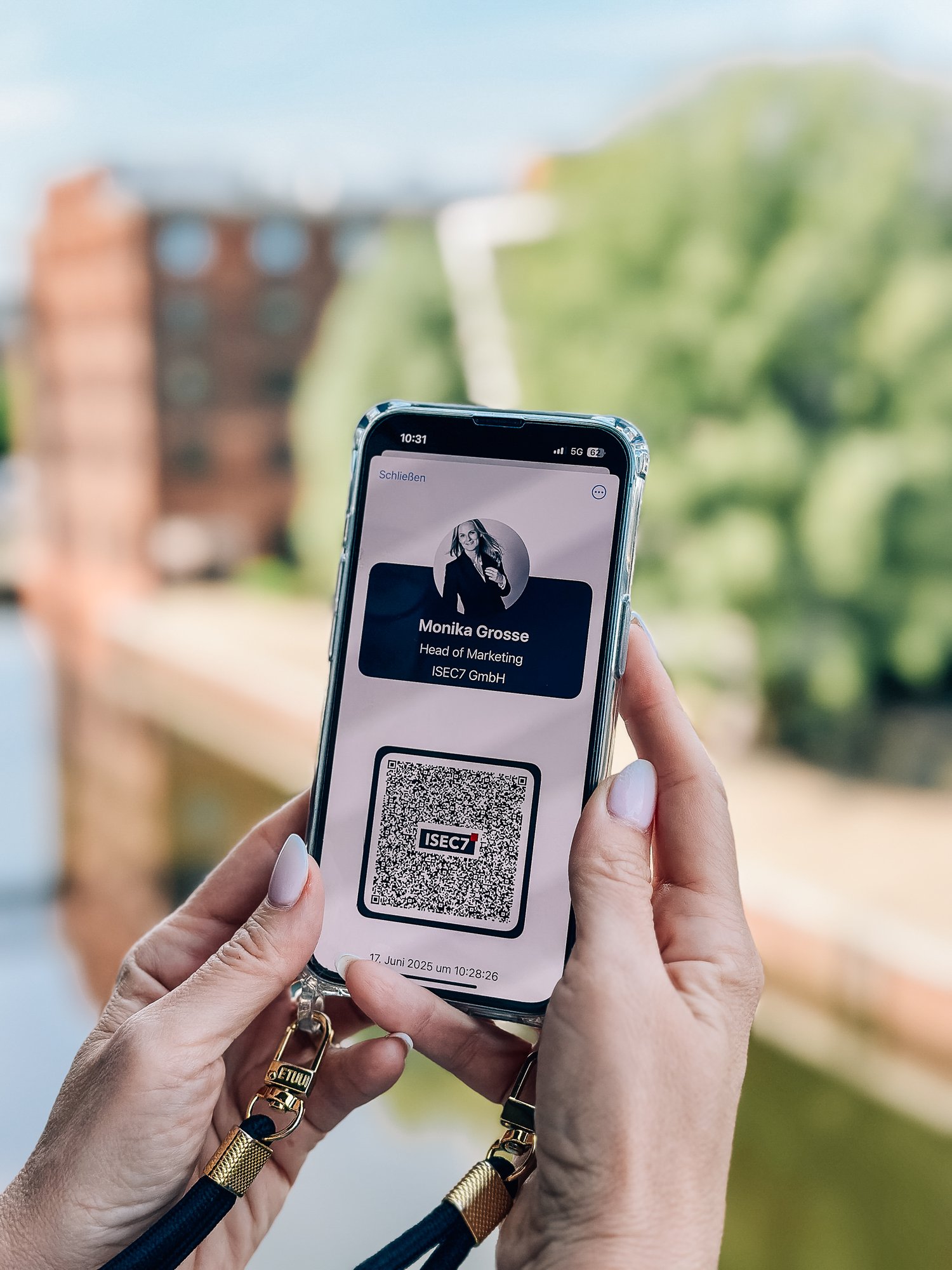
- Share your digital business card and LinkedIn profile with a touch of a button
- Improve productivity and response time with significant impact on customer satisfaction
- Maintain security of sensitive information and comply with security policies
- Build greater team collaboration and transparency of knowledge share
ISEC7 MAIL WORKS WITH THE FOLLOWING UEM CONTAINERS
INTEGRATED SECURITY OUT OF THE BOX
Security features included
ISEC7 MAIL ships with these security features:
- Native UEM container integration for BlackBerry Dynamics, Ivanti AppConnect, Omnissa Workspace ONE, Citrix Ready and Microsoft Intune
- Secure S/MIME encryption for multiple mailboxes within ISEC7 MAIL
- Multiple authentication methods (modern auth, certificates, AirID, YubiKey, CAC cards, Hypergate)
- Ongoing Veracode verification for software development
- Support for GDPR-compliant contact handling for Apple Car Kit integration
.png)
ISEC7 MAIL IS RED-NETWORK CAPABLE IN COMBINATION WITH THE HYPORI SOLUTION AND COMPLIANT WITH THE FOLLWING STANDARDS
FEATURE SET
Features at a glance
- Access your own inbox ( mail, calendar, tasks, notes )
- Access delegate mailboxes without any middleware or password sharing
- Access Public Folders and Functional Mailboxes
- Global address list sync, with contacts available offline
- Share your digital business card or LinkedIn profile with a touch
- Various calendar views incl. multiple mailbox overlays
- GDPR compliant use of contact in cars ( Apple Car Kit integration )
- Classify your communication while on the road ( requires ISEC7 CLASSIFY addon )
Contacts on the corporate device
The global address list, offline as well
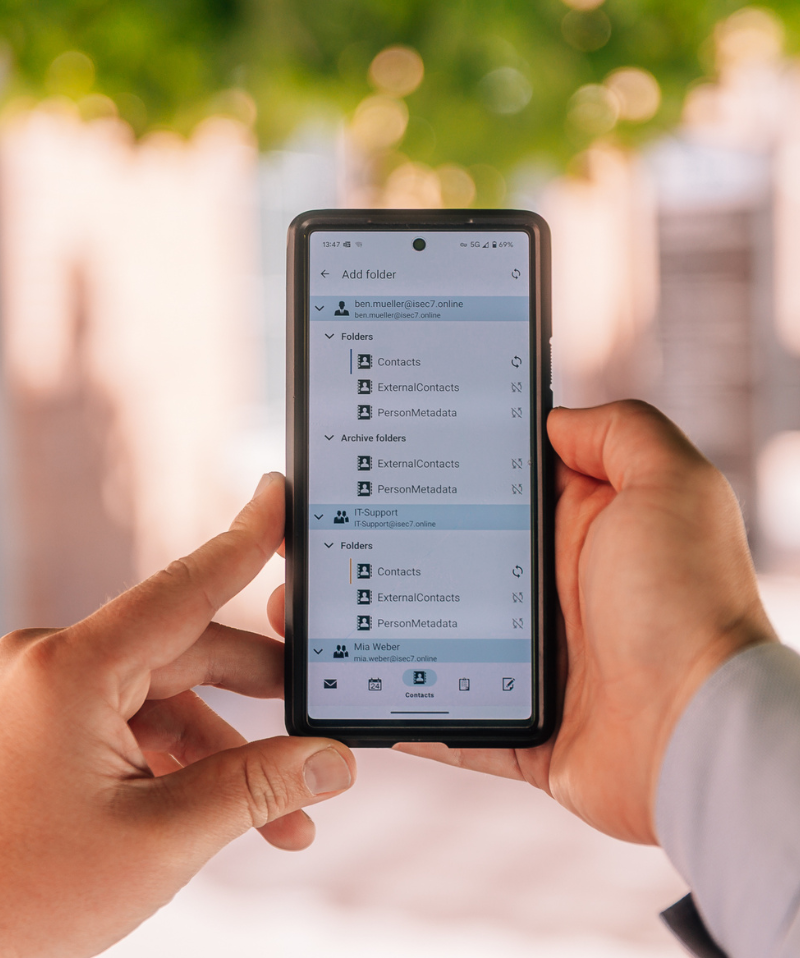
ISEC7 MAIL syncs the global address list of your Microsoft Exchange or Microsoft 365 environment into the UEM container on the device. The contacts are available there offline, without anyone having entered them by hand first. If you run Salesforce, you connect the CRM contacts the same way and get name resolution on the phone with them.
In the car, ISEC7 MAIL resolves numbers through the Apple Car Kit integration. The contact handling behind it is built to be GDPR-compliant. The data stays inside the container and does not travel into the private address book on the device.
- Global address list sync from Microsoft Exchange and Microsoft 365
- Contacts available offline
- Salesforce contacts with name resolution on the phone
- GDPR-compliant use of contacts in the car through Apple Car Kit
- Delegate access to contacts as well, without password sharing
- Share your digital business card and LinkedIn profile with a touch of a button
- Contacts stay inside the UEM container: BlackBerry Dynamics, Ivanti AppConnect, Omnissa Workspace ONE, Citrix Ready and Microsoft Intune
For your operations documentation this means one contact source, one container, and no copies in the private address book.
Hardware-backed authentication
S/MIME signing and encryption on a YubiKey
Private keys that never leave the token. With a YubiKey, the S/MIME certificate lives in the hardware PIV slot, so the signing and encryption keys are never exposed to the phone or the operating system. ISEC7 MAIL uses that certificate to sign and encrypt mail across every connected mailbox.
ISEC7 MAIL never accesses the key directly. On the device, the Yubico Authenticator app brokers access to the PIV store, on iOS through Apple's CryptoTokenKit interface. That keeps the trust boundary in the hardware, where it belongs for classified and regulated environments.
- Certificate stays in the YubiKey PIV slot, with no key material on the device
- Connect by USB-C, Lightning, or an NFC tap
- Works on iOS and Android, inside your existing UEM container
- Part of ISEC7 MAIL's wider authentication options: modern auth, certificates, AirID, CAC/PIV cards, and Hypergate
Implementation & architecture
Rolled out through your UEM, no user input
ISEC7 MAIL finds its mailbox through Autodiscover or receives its configuration via AppConfig from your UEM. Users do not have to enter anything, and no additional middleware component is required.
Which Exchange environments does ISEC7 MAIL work with?
- Mobile OS: iOS and iPadOS 16.0 or later, and Android
- Microsoft Exchange Server on premises, Exchange Online in Microsoft 365, and hybrid deployments
- UEM container: BlackBerry Dynamics, Ivanti AppConnect, Omnissa Workspace ONE, Microsoft Intune, Citrix, or unmanaged from the store
- Support for AppConfig via UEM
.png?width=600&height=379&name=ISEC7-MAIL-Architecture-v002-21082024%20(1).png)
Questions and answers
Frequently asked questions about ISEC7 MAIL
Which email app for iPhone and Android works with on-premises and hybrid Exchange?
In a hybrid deployment, some mailboxes sit on the on-premises Exchange Server and some in Exchange Online. The app has to reach both and also support modern sign-in against on-premises Exchange, for example through Hybrid Modern Authentication. ISEC7 MAIL works with mailboxes in your own data center, in Exchange Online and in hybrid setups. It connects over Exchange Web Services (EWS) and the Microsoft Graph API rather than Exchange ActiveSync, and supports Hybrid Modern Authentication on iOS.
What does the EWS retirement in Exchange Online mean for mobile email apps?
Microsoft disables EWS in Exchange Online by default on October 1, 2026 and shuts it down for good on April 1, 2027; Exchange Server on premises is not affected. Apps that reach Exchange Online over EWS need to be on the Microsoft Graph API by then. ISEC7 MAIL is switching with a Graph-based release planned for early Q1 2027; until then, an AppID allow list and the EwsEnabled setting keep it connected. The steps are on our EWS retirement page.
How do I access a delegated or shared mailbox on an iPhone or Android phone?
Permissions come from Exchange: the mailbox owner grants delegate access in Outlook as usual, and administrators assign functional and shared mailboxes. On the phone you then need a client that actually adds those extra mailboxes. ISEC7 MAIL connects any number of delegate mailboxes, along with functional mailboxes, shared mailboxes, group calendars and public folders. Delegation covers contacts, tasks and notes as well as mail and calendar, and nobody has to share a password.
How do I sign and encrypt email with S/MIME on a work phone?
S/MIME needs a certificate for each user from your organization's PKI and a mail client that can use that certificate on the device. ISEC7 MAIL signs and encrypts with S/MIME, can use separate certificates for signing and encryption, and imports certificates from an LDAP PKI. Administrators can enforce signing and encryption via MDM. Purebred is supported for derived credentials in the US Department of Defense environment.
Can the S/MIME certificate live on a YubiKey instead of the phone?
Yes. On a hardware token such as the YubiKey, the certificate sits in the PIV slot and the private key never leaves the token. The mail app needs an interface to the token, such as Apple's CryptoTokenKit on iOS. ISEC7 MAIL uses the certificate on the YubiKey to sign and encrypt across all connected mailboxes; the Yubico Authenticator app brokers access, and the key connects over USB-C, Lightning or NFC. Setup is shown on our ISEC7 MAIL with YubiKey page.
How do I keep work email and contacts out of personal apps on a phone?
The usual approach is a managed container: the UEM separates work apps and data from personal ones and enforces policies such as DLP, remote lock and remote wipe on the work side. ISEC7 MAIL runs inside BlackBerry Dynamics, Ivanti AppConnect, Omnissa Workspace ONE, Microsoft Intune and Citrix containers. The client syncs the global address list into the container, where contacts stay available offline and do not end up in the device's personal address book.
Which email apps support Intune app protection policies on iOS and Android?
Intune app protection policies apply in apps that include the Intune App SDK or have been prepared with Microsoft's App Wrapping Tool. ISEC7 MAIL is available as a separate app, "ISEC7 MAIL for Intune", for iOS and Android with the Intune SDK built in, so the policies apply directly inside the app.
How do I apply classification markings or sensitivity labels to email on a phone?
The mail client on the device has to read and set the marking itself, whether it is a Microsoft Purview sensitivity label or your organization's own classification scheme. ISEC7 MAIL reads and sets classifications, displays Purview sensitivity labels, applies them when composing, and prevents downgrading them on reply or forward. Administrators can enforce marking via AppConfig, and the client also supports a Secure Email Marking Plugin (SEMP). Custom schemes, recipient checks and auditing come with ISEC7 CLASSIFY, licensed separately.
Which ISEC7 MAIL variant do I need for a container, remote wipe or FIPS 140-2?
The app offers the same features in every variant; the protection mechanisms differ. DLP policies, remote lock, compliance checks and remote wipe apply as soon as ISEC7 MAIL is managed through a UEM. A dedicated managed container and FIPS 140-2 for data at rest and in transit come with the SDK variants for BlackBerry Dynamics, Omnissa Workspace ONE, Ivanti AppConnect and Microsoft Intune, and the FIPS evidence is provided through the respective SDK.
Does email pass through an ISEC7 server or cloud?
No. ISEC7 MAIL connects directly to your Exchange or Microsoft 365, with no middleware component or relay service from ISEC7. In the SDK variants the connection runs through your UEM vendor's infrastructure, as you run it today.
Last reviewed: September 28, 2026 · Feature information based on the ISEC7 MAIL product comparison, August 2026 · Minimum iOS version as listed in the App Store



Manage and monitor your Digital Workplace