ISEC7 GROUP
ISEC7 CLASSIFY

DATA CLASSIFICATION & DATA MARKING
ISEC7 CLASSIFY is a platform for classifying and marking email, attachments and Microsoft Office documents, built for government agencies and organizations that must handle information under fixed classification schemes. It runs as an add-in in Outlook, Outlook on the web, Word, Excel, PowerPoint and SharePoint Pages, and inside ISEC7 MAIL on iOS and Android. Users apply the marking themselves while the rule set decides what is allowed: no email leaves without a classification, and untrusted recipient domains can be blocked. ISEC7 ships standard schemes for BUND (German federal government), NATO and Traffic Light; custom schemes, configuration and reporting are managed centrally in ISEC7 SPHERE.
-
AVAILABLE FOR SMARTPHONE & DESKTOP
-
WORKS WITH MICROSOFT 365
-
NO-CODE EDITOR FOR CLASSIFICATION PATTERNS
-
COMPLIANCE TRACKING AND AUDIT VIA ISEC7 SPHERE
Classification in Outlook, Office, SharePoint and ISEC7 MAIL
ENFORCE CLASSIFICATION
Classification enforced before sending
With ISEC7 CLASSIFY, your users mark email, attachments and Microsoft Office documents according to your organization's scheme. An email without a classification cannot be sent, and the recipient domain check can block delivery to untrusted domains. Mistakes surface before the message leaves the organization.

HOW it WORKS
Where ISEC7 CLASSIFY works
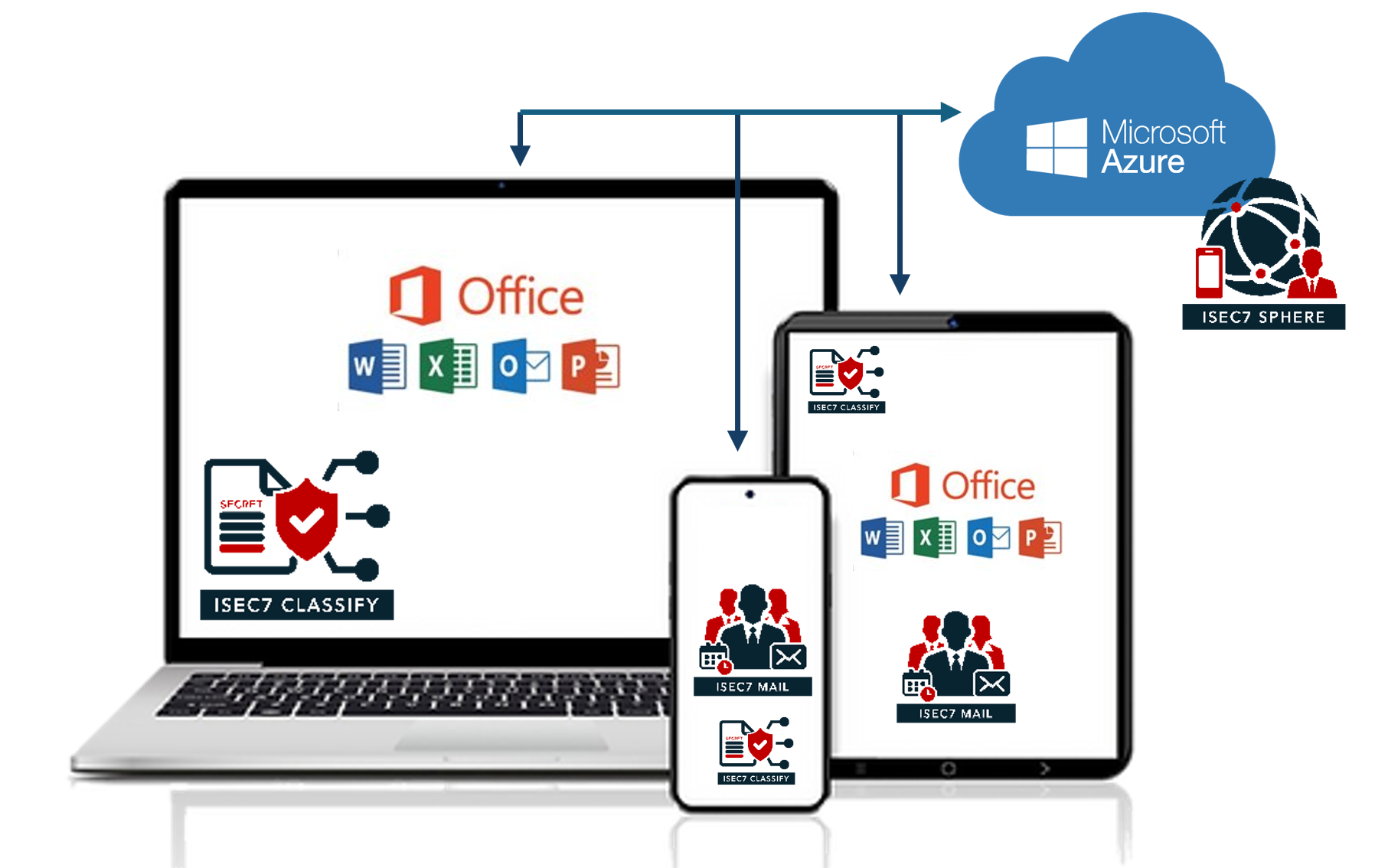
ISEC7 CLASSIFY runs as an add-in in Microsoft 365 apps and is built into ISEC7 MAIL on iOS and Android. One rule set applies across all of them, and the interface works the same way everywhere.
-
Outlook, Outlook desktop and Outlook on the web
-
Microsoft 365 Apps | Word, Excel, PowerPoint
-
ISEC7 MAIL | mobile email
-
Microsoft SharePoint Pages
ISEC7 CLASSIFY & ISEC7 SPHERE
How ISEC7 CLASSIFY and ISEC7 SPHERE work together
ISEC7 CLASSIFY works in conjunction with ISEC7’s proprietary management and monitoring solution ISEC7 SPHERE, providing classification statistics and monitoring for compliance.
ISEC7 SPHERE serves as a central repository for classification markings, caveats, Special Access Program (SAP) markings, and other marking definitions, so together with ISEC7 CLASSIFY, you can easily edit and configure classifications for different national laws and regulations.


ISEC7 CLASSIFY
Key benefits
- Supports marking under government classification rules
- Verify proper sender and receiver permissions based on classification level and dissemination controls
- Works on any device including iOS and Android mobile devices
- Same features in Outlook on the web and Outlook desktop
Questions and answers
Frequently asked questions about ISEC7 CLASSIFY
How do I add classification markings to email and Office documents in Outlook?
You need a marking that is applied while composing and stays visible on the email or document, plus a rule set that defines which levels and caveats are allowed. ISEC7 CLASSIFY runs as an add-in in Outlook, Outlook on the web, Word, Excel, PowerPoint and SharePoint Pages, and inside ISEC7 MAIL on iOS and Android. An email without a classification cannot be sent.
What is the difference between Microsoft Purview sensitivity labels and government classification markings?
Sensitivity labels attach a tag to data that DLP policies in Microsoft Purview can act on later; they do not confirm whether a recipient is authorized to receive the information. ISEC7 CLASSIFY applies visible markings under government classification schemes and checks, before sending, whether a recipient may receive the information. Its markings stay with the email or document wherever it goes and include banner marking, portion marking, designation blocks, caveats and handling instructions for the recipient. We therefore see the add-in as a complement to Purview, not a replacement; there is more in our blog post from April 8, 2025.
How do I stop a classified email from going to an unauthorized recipient?
What works is a pre-send check that compares the classification with the recipient addresses and holds the message back if needed. An after-the-fact report only shows the mistake once the email has left. ISEC7 CLASSIFY distinguishes trusted from untrusted domains, blocks untrusted recipients, and raises an alert when classified information is about to go to addresses outside the verified list. The check is based on the message's classification level and dissemination controls, and an email with no classification at all cannot be sent in the first place.
What is portion marking, and how do I apply it in Outlook?
With portion marking, each paragraph of a message carries its own classification, so readers can see which part needs which level of protection; banner marking labels the message as a whole. ISEC7 CLASSIFY detects the portions of an email body automatically: every visually separate paragraph counts as its own portion, and a single line break starts a new one. Either all portions are marked or none. Banner marking and targeted marking of subject and body are available as well.
How do I mark attachments when the file name and the content have different classifications?
An attachment's file name is information in its own right and can carry a different classification than what is inside the file, so the two are marked separately. ISEC7 CLASSIFY classifies attachment title and content separately, marks all attachments of an email in one step, and offers separate caveats for attachment content. Subject, body and attachments are all covered.
Can I classify email on an iPhone or Android phone?
Yes, as long as the mail client on the device applies the marking itself and uses the same rule set as Outlook on the desktop. On iOS and Android, ISEC7 CLASSIFY is a separately licensed add-on to ISEC7 MAIL, using the same rule set as Outlook and the other Microsoft 365 apps. You distribute the mobile configuration as AppConfig through your UEM, so nothing has to be set up on the device. The mail app has basic classification features of its own; custom schemes and profile-based enforcement come with the add-on.
How do I show an auditor where classified email went?
You need a record for each message with sender, recipient, timestamp and classification, in one place and across all clients. For ISEC7 CLASSIFY, that record lives in ISEC7 SPHERE: compliance tracking at organization and user level, auditing and log files, and the archive of classified communication. Recipient domains confirmed by users are visible per environment. Messages that bypassed classification through a group rule are stamped, so exceptions remain traceable too.
Which classification schemes come with ISEC7 CLASSIFY, and can we create our own?
ISEC7 ships standard schemes for BUND (German federal government), NATO and Traffic Light; US-specific schemes are provided only on authorized request. Your administrators build their own schemes in the ISEC7 SPHERE Schema Editor without writing code, and can adapt the standard schemes there too. Several schemes can be active at once, for example a corporate scheme alongside BUND and NATO, and users switch between them with a profile switcher. The schemes reproduce marking rules; they do not carry any approval by the BSI or NATO.
Does ISEC7 CLASSIFY need its own servers?
No. On the desktop, ISEC7 CLASSIFY is a Microsoft Office add-in with no additional software to install, hosted as Azure Platform as a Service. Configuration and reporting run through ISEC7 SPHERE.
Last reviewed: September 28, 2026 · Feature information based on the Outlook add-in release notes up to version 1.0.19 and on ISEC7 MAIL Android 1.10.5 and iOS 1.10.7

Manage and monitor your Digital Workplace
ISEC7 CLASSIFY Adressed the most significant challenges that our organization has faced, when the Geopolitcal situation changed. Now we can ensure information keep in our hands, or the hands of our trusted alliance partners.